Evading Firewalls and IDS with Nmap
A technical guide on how to use Nmap's evasion techniques to bypass modern firewalls
By default, Nmap is not a subtle tool. When you run a standard SYN scan (nmap -sS), it knocks on thousands of digital doors in seconds.
To modern Firewalls and Intrusion Detection Systems (IDS), a default Nmap scan looks like a fireworks display in a dark room. The firewall will instantly log your IP address, drop your packets, and lock you out.
If you are performing a red team assessment, you cannot afford to be noisy. You have to slip past the perimeter defenses. Nmap includes a powerful arsenal of evasion techniques designed to trick, confuse, or bypass these security appliances.
Here are the top three methods for staying under the radar.
1. Packet Fragmentation (-f)
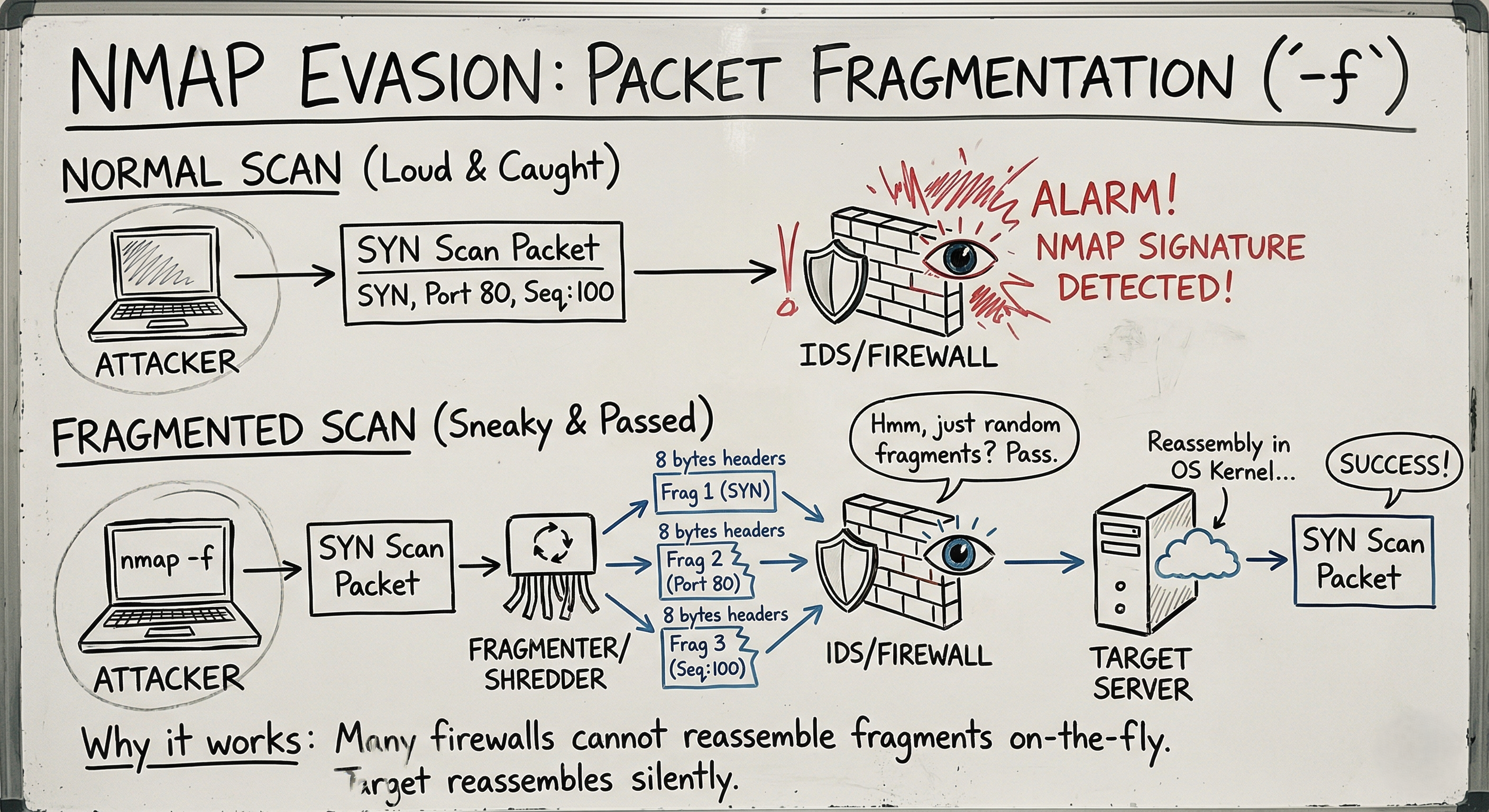
Firewalls and IDS appliances work by inspecting the contents of network packets and comparing them against known malicious signatures.
The Concept: If the security guard is looking for a specific restricted document, you don’t hand it to them whole. You run it through a shredder, mail the pieces separately, and have someone reassemble it on the inside.
When you use the -f flag, Nmap breaks the TCP header into tiny 8-byte fragments.
1
2
3
4
5
# Fragment the packets into 8-byte chunks
nmap -f 192.168.1.100

# Double the fragmentation (16-byte chunks)
nmap -ff 192.168.1.100
Why it works: Many older or poorly configured firewalls do not have the processing power to reassemble fragmented packets on the fly. They simply pass the fragments through to the target system. The target server’s operating system then quietly reassembles the fragments, and the scan succeeds without triggering the IDS alarm.
2. Decoy Scans (-D)
What is the best way to hide a tree? In a forest.
The Concept: Instead of trying to be invisible, you make yourself impossibly visible by bringing a crowd. A decoy scan sends out probes from your real IP address, but mixes them with probes forged to look like they came from other, random IP addresses.
1
2
3
4
5
# Scan using three fake IPs, plus your own (ME)
nmap -D 10.0.0.5,10.0.0.6,10.0.0.7,ME 192.168.1.100

# Let Nmap generate 5 random decoys for you
nmap -D RND:5 192.168.1.100
Why it works: The target’s IDS will detect the scan. However, the security logs will show that they are being scanned by 6 different IP addresses simultaneously. The network administrator has no idea which IP is the real attacker and which ones are innocent bystanders.
Note: Be careful not to use active, heavily monitored IPs (like a government server) as your decoy, or you might accidentally trigger a massive incident response against an innocent party!
3. Source IP Spoofing (-S)
Sometimes, firewalls are configured with strict “Allow-Lists.” They block all incoming traffic unless it comes from a specific, trusted machine (like the IT Admin’s desktop or a network printer).
The Concept: If you know the IP address of that trusted machine, you can instruct Nmap to forge your packets so they appear to come from the trusted source.
1
2
# Syntax: nmap -S [Fake Source IP] -e [Your Interface] [Target]
nmap -S 192.168.1.15 -e eth0 192.168.1.100
The Catch: This is a “blind” scan. Because you forged the return address, the target server will send its replies back to the trusted machine, not to you! To actually see the results of this scan, you must be in a position to sniff the network traffic (e.g., via ARP spoofing) or have access to the trusted machine.
Bonus: MAC Address Spoofing (--spoof-mac)
If the network uses MAC filtering (common in wireless networks or tight corporate LANs), you can spoof your physical hardware address just as easily.
1
2
# Spoof an Apple device MAC address
nmap --spoof-mac Apple 192.168.1.100
The Ultimate Evasion: Patience (-T)
The most common reason a scan gets caught is speed. IDS appliances monitor for connection rate limits (e.g., “Alert if an IP touches 100 ports in 1 second”).
You can adjust Nmap’s timing template using the -T flag (0 to 5).
-T4/-T5: Aggressive and Insane (Loud, fast, easily caught).-T3: Normal (Default).-T1/-T0: Sneaky and Paranoid.
1
nmap -T1 192.168.1.100
At -T1, Nmap waits 15 seconds between sending each probe. It might take hours to scan a machine, but it will slide right under the rate-limiting thresholds of almost any modern IDS.
Summary for the Exam
- Fragmentation (
-f): Splits TCP headers to bypass signature detection. - Decoys (
-D): Masks your real IP in a crowd of spoofed IPs. - Source Spoofing (
-S): Impersonates a trusted IP (requires network sniffing to see results). - Timing (
-T0to-T1): Slows down the scan to evade rate-based alarms. - No Ping (
-Pn): Always use this when evading firewalls, as traditional ICMP Pings are blocked by almost everything today.