Exfil-Sentry: What We Learned Building a VNC Exfiltration Defense (SIH 2025)
A personal note to myself and a technical walkthrough on how we built our project
It’s easy to think of “data exfiltration” as something that happens through obvious channels like HTTP uploads, suspicious DNS, or a compromised cloud bucket.
But when we got the Smart India Hackathon 2025 problem statement from NTRO “Identification and Protection of VNC-based Data Exfiltration Attacks” and it forced me to zoom in on something I hadn’t considered deeply enough:
What if the attacker doesn’t need a fancy exfil channel at all? What if they just use your VNC server to extract sensitive data?
That question is basically what led us to build Exfil‑Sentry, a system that can simulate, detect, and respond to VNC-based exfiltration patterns in a controlled environment.
This post is a technical walkthrough of what we built, what worked, what surprised me, and how I’d improve it next.
The threat model (in plain terms)
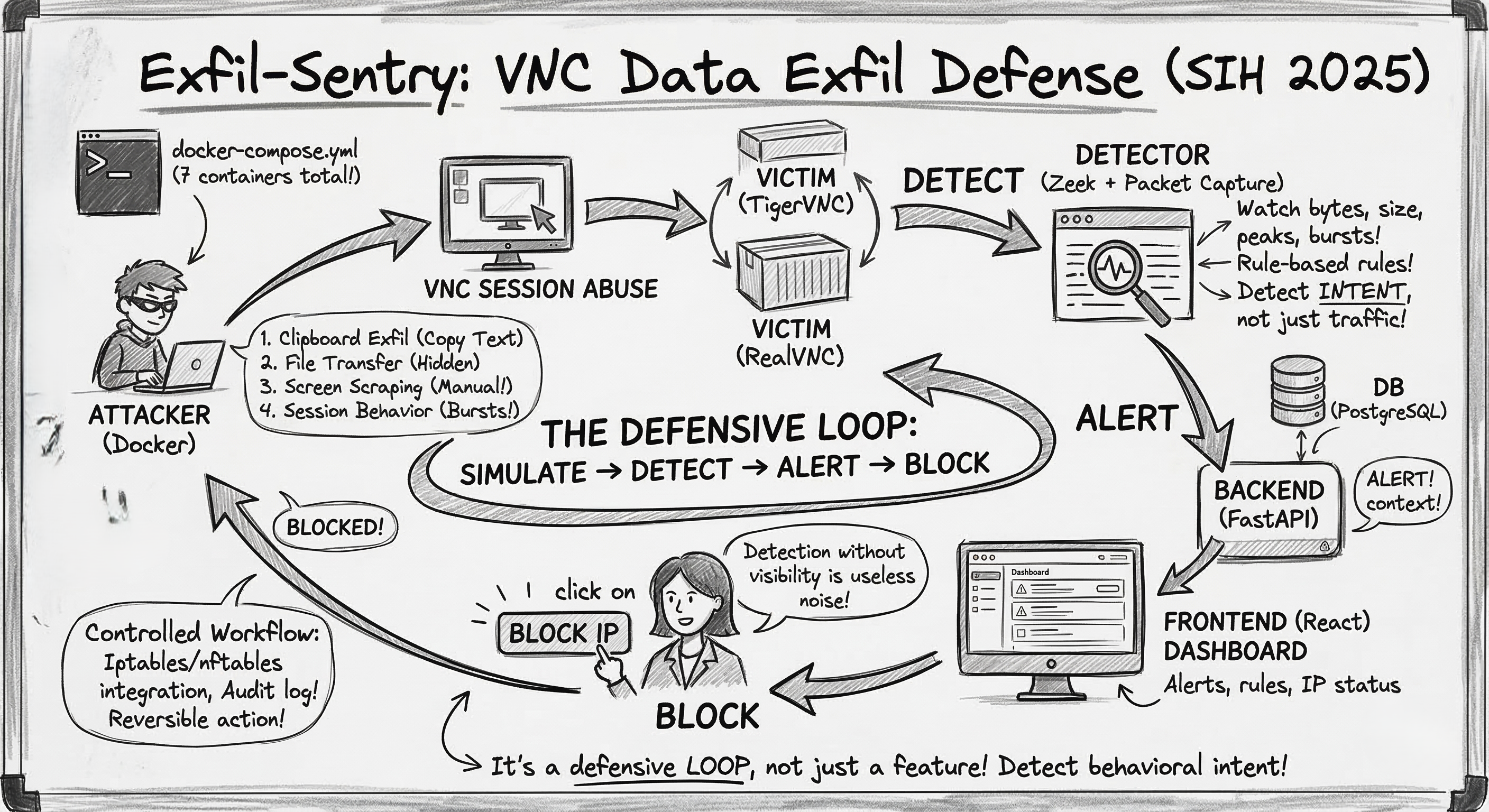
VNC (Virtual Network Computing) is used for remote desktop access. Once someone has a VNC foothold, exfiltration can happen in ways that don’t look like classic “file transfer malware”:
- Clipboard exfiltration (copying sensitive text out)
- File transfer (depending on implementation / features enabled)
- Screen scraping / screen capture (the “manual exfil” nobody thinks about)
- Abuse of session behavior (weird connection frequency, bursts of data)
The uncomfortable part: a lot of these can look like “normal VNC usage” until you look closer at behavior.
So we decided to approach it like defenders:
- Create repeatable attack simulations (so detections can be tested)
- Observe VNC traffic at the network layer
- Raise alerts with context
- Enforce prevention quickly (block attacker IP)
That became our loop: simulate → detect → alert → block.
The architecture we ended up with (and why)
We built Exfil‑Sentry as a 7-container Docker Compose lab, because we wanted:
- fast setup for judges/mentors
- repeatability (same environment every run)
- isolation (so the “attacks” are safe)
The containers (high level)
- Frontend (React): dashboard for alerts + actions
- Backend (FastAPI): APIs, auth, orchestration, firewall integration
- Database (PostgreSQL): users, rules, alerts, audit logs
- Detector (Zeek + packet capture): network monitoring + rule evaluation
- Attacker: runs simulated VNC exfil behaviors
- Victim (TigerVNC) and Victim (RealVNC): two targets to make testing realistic
This separation helped in two ways:
- When something broke, we could isolate it quickly (capture vs. rules vs. UI).
- It felt closer to how real security systems are built: multiple components with clear responsibilities.
The “Attack → Detection → Prevention” loop
This is the core of the project, and the part I’m most proud of because it’s easy to explain and easy to demo.
1) Attack simulation
From the dashboard (or API), we trigger an attack:
- backend calls the attacker container
- attacker targets a chosen victim VNC server
This gave us repeatable scenarios like clipboard-style exfil and other session-driven abuse patterns.
2) Detection (network layer)
The detector container watches the VNC traffic and tries to answer:
“Is this session behaving like normal admin activity, or does it look like exfiltration?”
We approached this with a rule-based detection model (configurable thresholds), because during a hackathon you want:
- explainable logic
- quick tuning
- predictable behavior
Examples of signals we used or planned for:
- unusually large packet sizes
- repeated suspicious bursts
- connection frequency anomalies
- payload characteristics (where feasible)
The moment a rule triggers, we generate an alert and store it in PostgreSQL.
3) Alerting + visibility
The dashboard continuously pulls alerts and shows:
- what triggered
- which attacker IP was involved
- current status / triage state
This sounds basic, but it was a big lesson for me:
detection without visibility isn’t useful. If an analyst can’t quickly see what happened, detection becomes noise.
4) Prevention (blocking)
From the alert view, an analyst can block the attacker IP.
The backend applies enforcement using iptables/nftables (host-level integration). That turns the system from “just monitoring” into an actual defensive control.
This step is also where realism hits:
- you must be careful with privileges
- you need good audit logs
- you need a reversible action (unblock)
So we built it as a controlled workflow rather than “auto-block everything”.
What surprised me while building it
1) “The hard part isn’t detecting traffic. It’s detecting intent.”
Packet capture is straightforward compared to deciding what’s “suspicious” for VNC. VNC can be bursty even in legitimate use (screen updates, resizing, etc.).
This is why the system is built around tunable rules and a dashboard that supports investigation, not just auto-enforcement.
2) A demo-ready system needs automation, not just code
The setup scripts (setup.ps1 / setup.sh) ended up being more important than I expected.
If a project takes 45 minutes to run, it’s not demo-friendly.
Automating build + start + init + verification made the project usable by others.
3) Microservices aren’t “overkill” when you need isolation
Normally, I’d keep a hackathon project simpler.
But for this, splitting attacker/victim/detector made the solution easier to reason about and safer to test.
Why I’m open-sourcing it
We’ve made the repository public because I want this to be more than a hackathon artifact.
If you’re learning blue-team engineering, detection logic, Zeek-based monitoring, or just want a containerized lab to play with: I’d love for you to explore it, break it, and suggest improvements.
If you do check it out, the best feedback you can give me is:
- what alerts are useful vs noisy
- what rules you’d add
- what you’d want to see in the dashboard as an analyst
Repo / getting started
Repository: Anorak001/Exfil-Sentry
The project is containerized with Docker Compose. Once cloned, you can bring it up with:
1
docker compose up -d
From there:
- dashboard runs on
http://localhost:3000 - backend API docs at
http://localhost:8000/docs
Closing thoughts
SIH pushed me to think about security as a loop, not a feature.
A “cool detector” is nice, but a system that can simulate attacks, detect behavior, show actionable alerts, and support real response actions is where learning really compounds.
That’s what Exfil‑Sentry taught me, and it’s why I’m excited to keep iterating on it.
If you have thoughts, critiques, or ideas, I’d genuinely love to hear them.
Thanks for reading till the end!
PS: I’ll be back with a follow-up on a stealthy privilege escalation path on a VNC server that can lead to full control of the victim machine, stay tuned.