Exploiting NTFS Alternate Data Streams
Hiding Malicious Payloads within Innocent Files using NTFS Alternate Data Streams
Introduction: The Lie of “File Size”
When you look at a file in Windows, say notes.txt, and it says “1 KB,” you believe it. If you open it and see a few lines of text, you assume that is all the data contained in that file.
In the world of NTFS (New Technology File System) the standard file system for Windows this assumption is a vulnerability.
NTFS allows a single file entry to point to multiple streams of data.
- The Main Stream (
$DATA): This is what you see when you double-click the file. - Alternate Data Streams (ADS): These are hidden “backpacks” attached to the file. They can contain text, images, or even full executable binaries.
A 1 KB text file can secretly carry a 500 MB hacker toolkit in an alternate stream, and Windows Explorer will still report the file size as 1 KB. 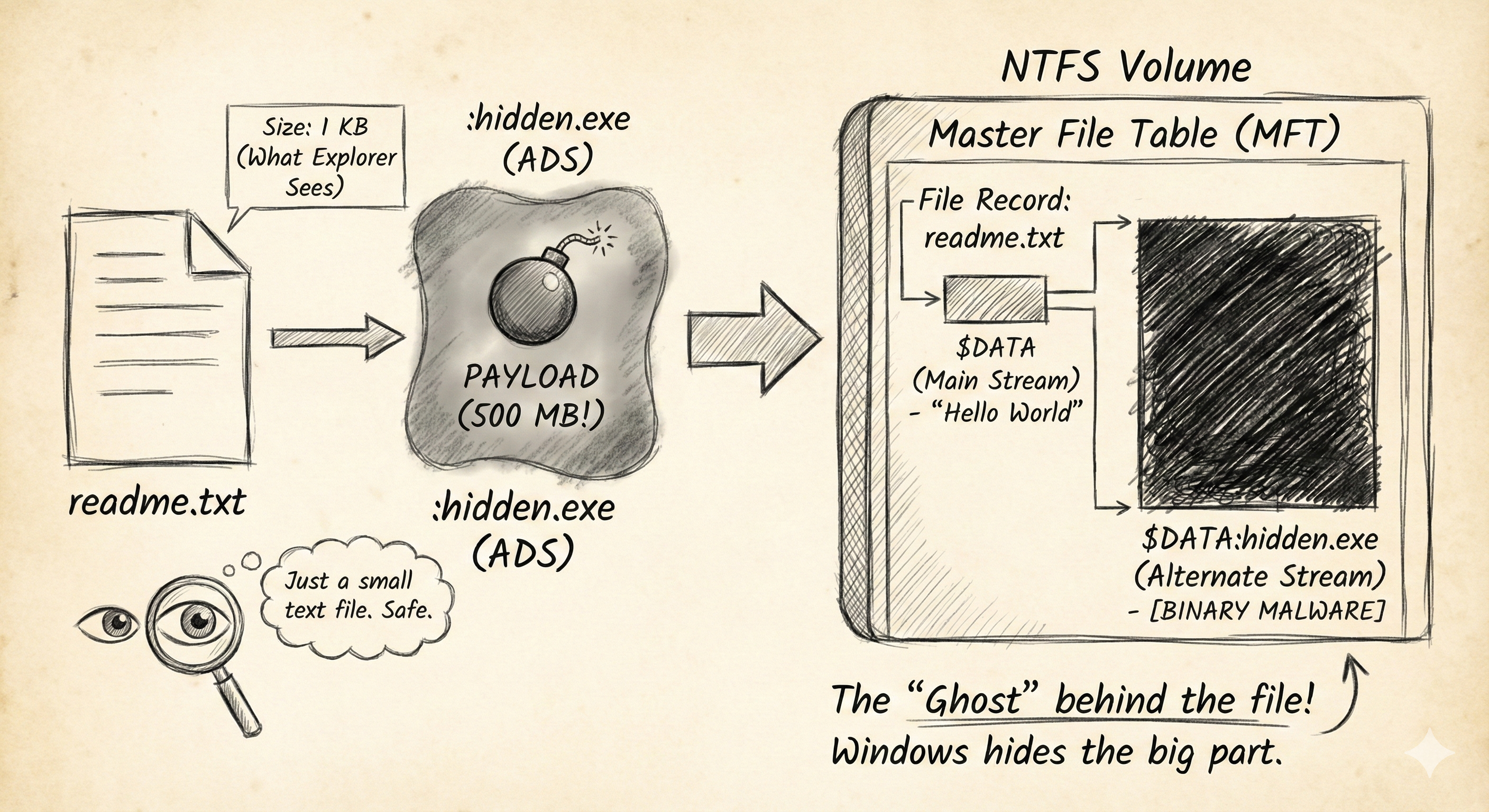
How it Works: The MFT Record
Every file on a Windows drive is just a record in the Master File Table (MFT). This record has “Attributes.” The content of the file is just one attribute called $DATA.
Microsoft designed ADS for compatibility with Macintosh HFS (which uses “resource forks”) and for storing metadata (like when you download a file and Windows knows it came from the Internet that “Zone Identifier” is stored in an ADS).
Hackers abuse this to hide payloads.
The Attack: Hiding a Payload
You do not need special hacker tools to use ADS. You just need the standard Windows Command Prompt.
Scenario: You have a payload named malware.exe and an innocent text file named readme.txt.
1. Creating the Ghost
We use the colon operator (:) to target a stream.
1
2
type malware.exe > readme.txt:hidden.exe
- What happened? We piped the content of
malware.exeinto a new stream namedhidden.exeattached toreadme.txt. - The Result: If you type
dir,readme.txtstill looks exactly the same size. If you verify the hash of the main stream, it hasn’t changed. The malware has technically “disappeared” into the file system metadata.
2. Executing the Ghost
You cannot simply double-click the stream. Windows Explorer doesn’t know how to show it. You must invoke it via the command line or system tools.
- Method A (Wmic): The Windows Management Instrumentation Command-line.
1
2
wmic process call create "C:\path\to\readme.txt:hidden.exe"
- Method B (Rundll32): If the hidden file is a DLL.
1
2
rundll32 readme.txt:hidden.dll,EntryFunction
This allows a Red Teamer to maintain persistence. They can hide their backdoor attached to a system file like calc.exe or notepad.exe and trigger it remotely.
The Defense: Hunting the Ghosts
Standard dir commands lie. Windows Explorer lies. So how do you find them?
1. The /r Flag
The standard directory listing command has a secret switch.
1
2
dir /r
Output:
1
2
3
12/28/2025  10:00 AM                24 readme.txt
                                52,000 readme.txt:hidden.exe:$DATA
The /r flag reveals the ADS, showing its name and its actual size.
2. PowerShell
PowerShell is more honest about file streams than CMD.
1
2
Get-Item -Path .\readme.txt -Stream *
This command lists all streams associated with the file object.
3. Sysinternals “Streams”
Microsoft provides a tool called streams.exe in the Sysinternals suite specifically to hunt and delete these streams recursively.
1
2
streams -d -s C:\Users\Target\Documents
-s: Recurse subdirectories.-d: Delete the streams found.
Summary for the Exam
- NTFS ADS: A feature allowing data to be hidden behind a file name using the
filename:streamnamesyntax. - Zone.Identifier: The most common legitimate use of ADS (marking files downloaded from the internet).
- Detection: Use
dir /rorGet-Item -Stream. Standard antivirus often scans ADS, but simple manual inspection tools do not. - Usage: Ideal for hiding tools or staging payloads during post-exploitation without creating new files on the desktop.