Stealing Cloud Secrets with SSRF
Understanding Server-Side Request Forgery (SSRF) and how to defend against them
Introduction: The “Fetch” Feature
We are looking at a vulnerability that caused one of the largest data breaches in recent history (the Capital One breach). It occurs when a web server is a little too helpful.
Modern web applications often need to fetch data from other websites. Think of a social media site where you paste a link, and it automatically generates a preview image. Or a translation service where you provide a URL, and it translates the target page.
To do this, the application takes the URL you provide and makes an HTTP request from the web server itself.
Server-Side Request Forgery (SSRF) happens when an attacker abuses this functionality to force the server to make requests to unintended locations specifically, to internal networks that the attacker cannot reach directly.
The Analogy: The Gullible Security Guard
Imagine a highly secure corporate building. You are an outsider standing on the street. You cannot get past the front desk to see the secret files in the “Internal Archive Room.”
However, you notice a friendly security guard who offers a service: “Give me a public address, and I will go fetch a brochure from there for you.”
The SSRF Attack: Instead of giving the guard a public address, you hand him a note that says: “Fetch the file from the Internal Archive Room, Room 101.” Because the guard already works inside the building, the Archive Room trusts him. He walks in, grabs the secret file, and hands it to you out on the street. You used the guard’s trusted access to bypass the perimeter.
Attack Scenario 1: Breaching the Internal Network
Let’s look at a vulnerable web application feature: a profile picture downloader.
Normal Request: POST /upload_profile url=http://public-website.com/myface.jpg
The server downloads myface.jpg and saves it.
The Malicious Request: What if we point the server at its own internal network?
POST /upload_profile url=http://localhost/admin_panel
If the server is vulnerable to SSRF, it will request its own internal admin panel (which is usually blocked from the outside internet but allowed from localhost). The server fetches the admin page and displays it to the attacker as the “profile picture” output.
Attack Scenario 2: The Cloud Metadata Nightmare
This is where SSRF goes from “annoying” to “catastrophic.”
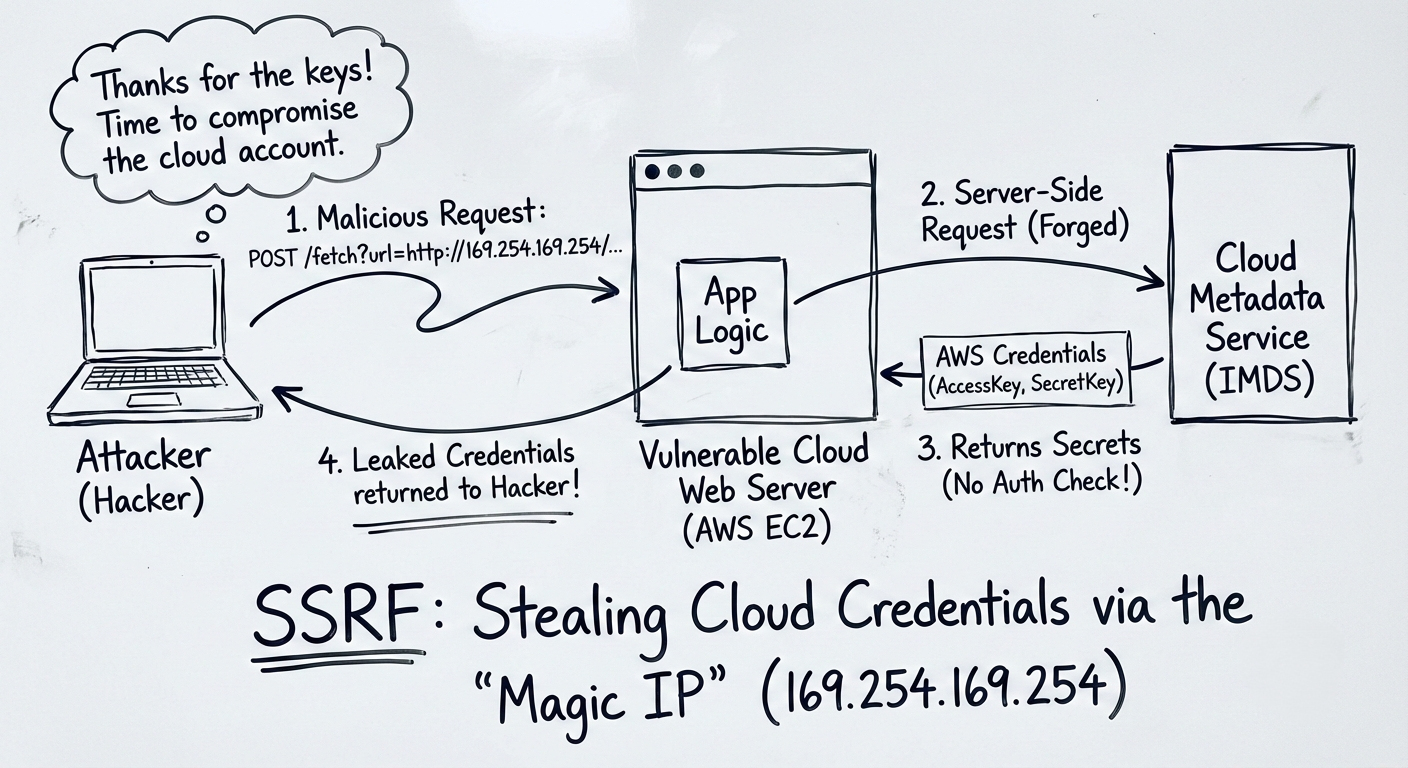
If the vulnerable web server is hosted in the Cloud (AWS, Azure, Google Cloud), it has access to a magical, non-routable IP address: 169.254.169.254.
This IP address is the Instance Metadata Service (IMDS). It is a local API that cloud providers use to give the virtual machine information about itself, including its temporary security credentials.
The Cloud SSRF Payload (AWS): url=http://169.254.169.254/latest/meta-data/iam/security-credentials/admin-role
If the attacker passes this URL into the vulnerable “fetch” feature, the AWS server will reach out to its own metadata service. The application will then return the server’s temporary AccessKeyId, SecretAccessKey, and SessionToken directly to the attacker.
With those keys, the attacker can log into the victim’s AWS environment from their own laptop and potentially delete databases, steal S3 buckets, or spin up crypto-mining servers.
Tools of the Trade
- Burp Suite: SSRF is almost entirely hunted manually using intercepting proxies like Burp Suite or OWASP ZAP. You look for parameters named
url,path,dest,uri, orwindowand try injectinglocalhostor127.0.0.1. - Interactsh / Burp Collaborator: Often, SSRF is “Blind.” The server fetches the URL but doesn’t show you the result on the screen. To test this, you tell the server to fetch a unique URL that you control (e.g.,
http://your-hacker-server.com/test). If your server receives a ping, you know the target is vulnerable, even if you can’t see the output.
Defense: How to Stop the Confused Deputy
Fixing SSRF is notoriously difficult because developers legitimately need the server to fetch external URLs.
- Allow-Listing (The Best Fix): If the app only ever needs to fetch images from
imgur.com, hardcode that domain. Reject any URL that does not exactly match the allowed list. - Network Segmentation: The web server should not have network access to internal databases or admin panels if it doesn’t need them. Use strict firewall rules so the server can’t reach
localhost/admin. - IMDSv2 (For the Cloud): AWS introduced IMDSv2, which requires a specific cryptographic header to access metadata. An SSRF attacker cannot easily inject headers, effectively neutralizing the cloud metadata attack.
Summary for the Exam
- SSRF: Tricking a server into executing a network request on the attacker’s behalf.
- Target: Internal systems behind the firewall, loopback addresses (
127.0.0.1), or Cloud Metadata APIs. - Impact: Internal port scanning, remote code execution, and cloud credential theft.
- Key IP Address:
169.254.169.254(Cloud Metadata Service).
This vulnerability highlights a core security truth: the perimeter firewall is useless if the attacker can convince the server inside the firewall to do the hacking for them.