Cracking WPA2 Wi-Fi Networks
A Step-by-Step Guide to Capturing and Cracking WPA2 Handshakes Using Aircrack-ng
Introduction: The Air is Free
In wired hacking, you need to plug a cable into a wall port or compromise a machine to see traffic. In wireless hacking, the medium is the air.
Radio waves do not stop at the office walls. They bleed into the parking lot, the street, and the coffee shop next door. If you have a wireless adapter that supports Monitor Mode, you can capture every single packet flying through the air, encrypted or not.
Today, we look at the standard for Wi-Fi security: WPA2 (Wi-Fi Protected Access 2). While it uses strong AES encryption, it has a fatal flaw in how users connect to it.
The Concept: The 4-Way Handshake
You cannot simply “sniff” a WPA2 password like you could with the ancient WEP protocol. WPA2 encrypts traffic effectively.
However, the weak point occurs the moment a user joins the network. When your phone connects to Wi-Fi, it engages in a conversation with the Router called the 4-Way Handshake.
- Router: “Here is a random number (ANonce).”
- Phone: “Here is my random number (SNonce) + a Message Integrity Code (MIC).”
- Router: “Verifying…”
- Phone: “Connected.”
The Flaw: That “MIC” in step 2 is derived from the Wi-Fi Password. If an attacker captures this handshake, they can take it offline and brute-force it until they find the password that creates that specific MIC.
The Tool: The Aircrack-ng Suite
In the CEH exam and Kali Linux, aircrack-ng is the Swiss Army Knife of Wi-Fi hacking. It is not one tool, but a suite of them. 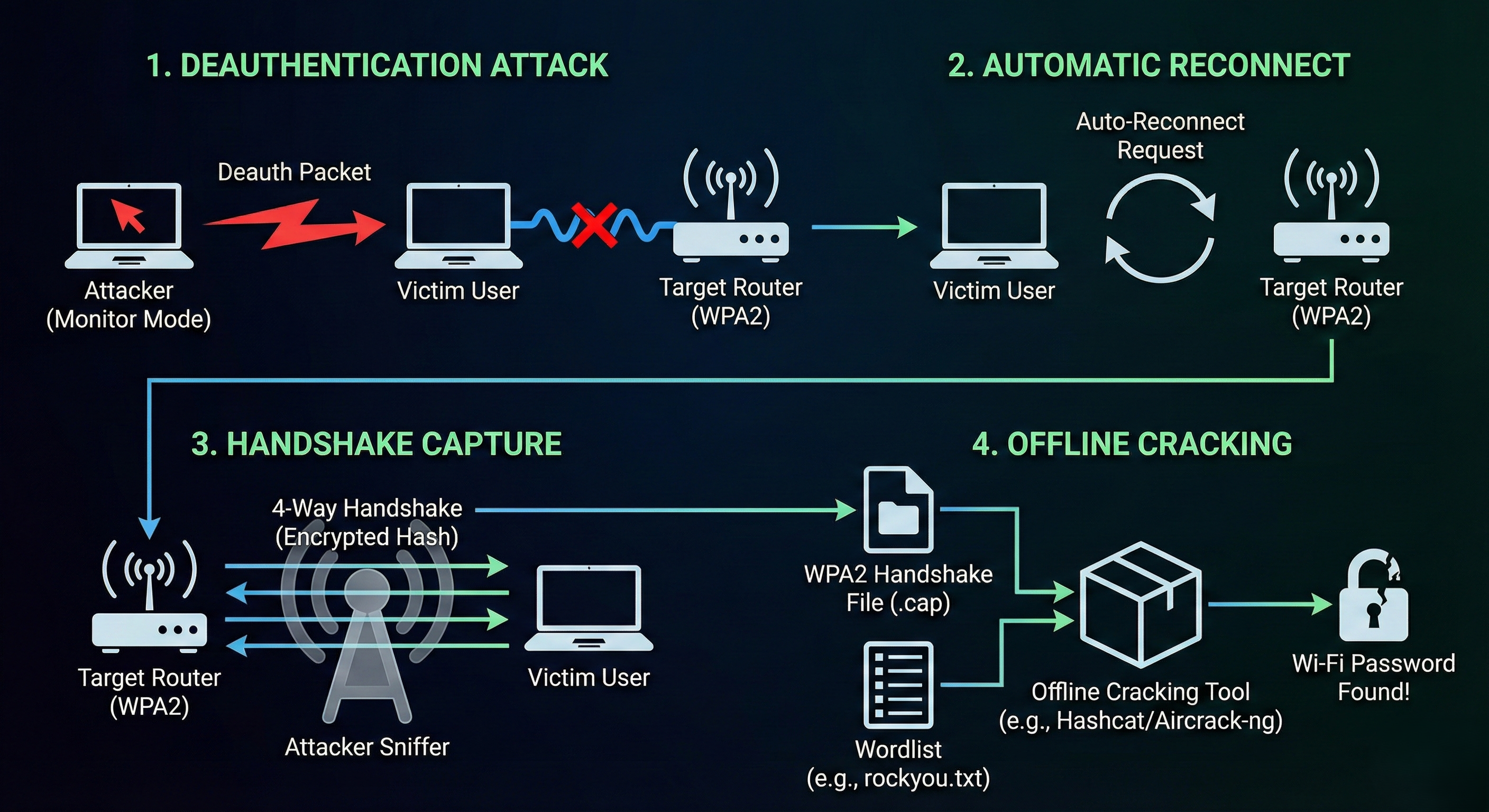
Step 1: Monitor Mode (The Ear)
Standard Wi-Fi cards ignore traffic not sent to them. We need to enable Monitor Mode (Promiscuous mode for Wi-Fi) to hear everything.
1
2
3
4
5
6
# Kill processes that interfere (like NetworkManager)
airmon-ng check kill

# Enable monitor mode
airmon-ng start wlan0
Your interface is now likely named wlan0mon.
Step 2: Reconnaissance (Airodump-ng)
Now we scan the airwaves to find our target.
1
2
airodump-ng wlan0mon
What to look for:
- BSSID: The MAC address of the Router (Target).
- CH: The Channel (e.g., 6).
- ESSID: The Name of the Network (e.g., “Corporate_WiFi”).
Step 3: Targeted Sniffing
Once we find the target, we lock our card to that specific channel and BSSID so we don’t miss a single packet.
1
2
airodump-ng -c 6 --bssid AA:BB:CC:11:22:33 -w capture_file wlan0mon
- Now we wait. We need a device to connect to the network to catch the handshake.
Step 4: The Deauthentication Attack (The Kick)
Hackers are impatient. We don’t want to wait hours for someone to come to work and connect. We force them to reconnect now.
We use aireplay-ng to forge “Deauthentication” packets. These tell a connected user: “I am the Router. Disconnect immediately.”
1
2
3
# Syntax: aireplay-ng -0 [Number of packets] -a [Router MAC] -c [Victim MAC] [Interface]
aireplay-ng -0 10 -a AA:BB:CC:11:22:33 -c 11:22:33:44:55:66 wlan0mon
The Result:
- The victim is kicked off the Wi-Fi.
- Their device automatically tries to reconnect.
- BINGO! Your running
airodump-ngscreen flashes:[ WPA Handshake: AA:BB:CC:11:22:33 ].
The Cracking: Hashcat
You now have a file (capture_file.cap) containing the cryptographic handshake. You can stop scanning. The rest is done offline using your GPU.
We convert the .cap file to a hash format (hc22000) and feed it to Hashcat.
1
2
3
# Mode 22000 is for WPA-PBKDF2-PMKID+EAPOL
hashcat -m 22000 capture_file.hc22000 /usr/share/wordlists/rockyou.txt
If the password is in the dictionary, Hashcat will crack it.
Defense: How to Secure Wi-Fi
- Password Length: The only defense against this attack is the complexity of the password. WPA2 passwords should be 20+ characters. A GPU can try billions of passwords per second; short passwords will fall instantly.
- WPA3: The new standard, WPA3, uses SAE (Simultaneous Authentication of Equals). It is specifically designed to prevent this “offline dictionary attack.” The handshake cannot be captured and cracked in the same way.
- Geofencing: reducing the signal power so the Wi-Fi doesn’t extend far beyond the building’s physical perimeter.
Summary for the Exam
- Monitor Mode: Allows capturing all traffic on a channel.
- BSSID: The Router’s MAC address.
- Deauthentication: A Denial of Service attack used to force a handshake capture.
- 4-Way Handshake: The authentication process containing the encrypted password hash.
- WPA3: The secure replacement that mitigates this specific attack vector.