Shodan 101
Using the search engine to find vulnerable IoT devices and exposed servers
Introduction: Google vs. Shodan
When normal people want to find a recipe or a news article, they use Google. Google works by crawling the web and indexing the content of websites (the text, the images, the HTML).
When hackers want to find an unsecured webcam, an unpatched database, or a city’s traffic light control system, they use Shodan.
Shodan does not care about websites. Shodan crawls the internet looking for devices. It constantly scans every public IP address on the internet, on every common port, and records the responses it gets.
If Google is a map of the world’s libraries, Shodan is a map of the world’s open doors and unlocked windows.
The Mechanism: Banner Grabbing
How does Shodan know what a device is without logging into it? It uses a core CEH concept called Banner Grabbing.
When you connect to a port on a server, the server usually replies with a polite “Hello” message before asking for a password. This message is the banner.
For example, if you connect to an FTP server on Port 21, the server might reply with: 220 ProFTPD 1.3.5 Server (ProFTPD Default Installation)
The administrator just leaked the exact software name and version number. Shodan saves this banner. An attacker can then search Shodan for “ProFTPD 1.3.5”, find a known exploit for that specific version, and compromise the server. 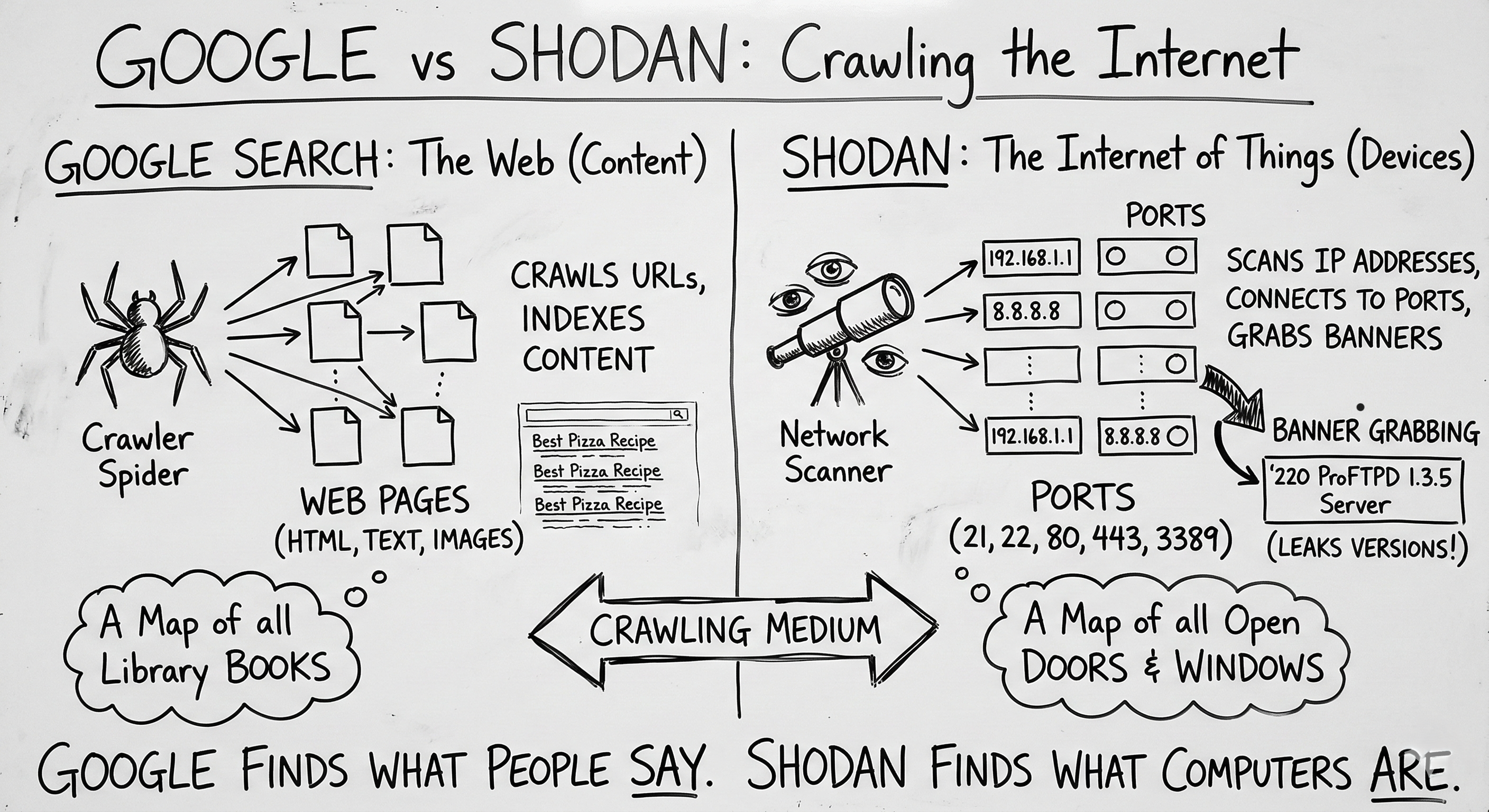
The Syntax: Shodan Search Filters
Using the basic search bar on Shodan will return too much noise. You need to use filters to narrow down your target. (Note: Some advanced filters require a paid Shodan account).
Here are the essential filters for a Red Teamer:
1. Filtering by Port and Protocol
If you are looking for specific vulnerable services, you search by port.
- Query:
port:23 - What it finds: Devices with Telnet open. Telnet sends passwords in cleartext. Finding this on the public internet in 2026 is a massive red flag.
- Query:
port:3389 - What it finds: Exposed Windows Remote Desktop Protocol (RDP) servers, a favorite target for ransomware gangs.
2. Targeting Organizations
During the Reconnaissance phase of an assessment, you want to find everything owned by your client.
- Query:
org:"Tesla Motors"ornet:192.168.1.0/24(using public IP blocks). - What it finds: All servers, routers, and employee VPN gateways registered to that company.
3. Finding End-of-Life Systems
You can search for specific operating systems that are no longer receiving security updates.
- Query:
os:"Windows 7" - What it finds: Machines that are likely vulnerable to older, highly reliable exploits like EternalBlue.
4. The Creepy Filter: Visual Recon
Shodan actually attempts to grab screenshots of services it connects to, like RDP desktops, VNC streams, and webcams.
- Query:
has_screenshot:true port:5900 - What it finds: Open VNC (Virtual Network Computing) sessions. You will literally see the desktop screens of remote computers.
The Internet of Threats (IoT)
Shodan is most famous for exposing the massive vulnerability of IoT devices.
People buy cheap webcams, smart thermostats, or NAS (Network Attached Storage) drives, plug them into their home routers, and never touch the settings. These devices often ship with Default Credentials (like admin / admin or root / 12345).
Because Shodan indexes the login pages of these devices, an attacker can simply search for the default banner of a specific camera brand, find thousands of them online, and log in using the factory password. No “hacking” required.
Defense: Hiding from Shodan
You cannot stop Shodan from scanning your public IP address. It is relentless. But you can change what it sees.
- Change Default Passwords: This is step one for any device. If it’s exposed, a strong password is your only immediate shield.
- Use a VPN / Hide Behind the Firewall: An IP camera should never be directly accessible from the internet. It should sit on an internal network. If you need to view it remotely, you should connect to your home/office via a VPN first.
- Change Default Banners: Many web servers allow you to suppress the version number in their banners. Tell Apache to just say “Apache,” not “Apache/2.4.49 (Debian)”.
- Change Default Ports: Moving SSH from port 22 to port 2222 won’t stop a dedicated attacker, but it will keep you out of the broad, automated sweeps that Shodan performs looking for low-hanging fruit.
Summary for the Exam
- Passive Reconnaissance: Querying Shodan is considered passive reconnaissance because you are not touching the target system; Shodan already did the scanning for you. There are no logs of your IP address on the target’s firewall.
- Banner Grabbing: The primary method Shodan uses to identify operating systems and software versions.
- SCADA/ICS: Shodan is notoriously used to find unsecured Industrial Control Systems (water plants, power grids).
- Default Credentials: The primary exploit vector for the IoT devices found on Shodan.
This tool is a stark reminder that if you put something on the internet, the entire world will know exactly what it is within 24 hours.