Evil Twin Attacks
A blog on how Evil Twin attacks work and how to defend against them.
When you walk into your favorite coffee shop let’s call it “Starbucks_Guest” your phone automatically connects to it. How does your phone know it’s the real network?
It doesn’t.
Devices identify wireless networks primarily by their SSID (Service Set Identifier, or the network name). They assume that if a network is named “Starbucks_Guest”, it must be the legitimate one.
An Evil Twin Attack exploits this blind trust. The attacker sets up a rogue Access Point (AP) with the exact same name and MAC address as the legitimate network, but with a stronger signal. The victim’s device drops the real network, connects to the attacker’s fake network, and walks right into a trap.
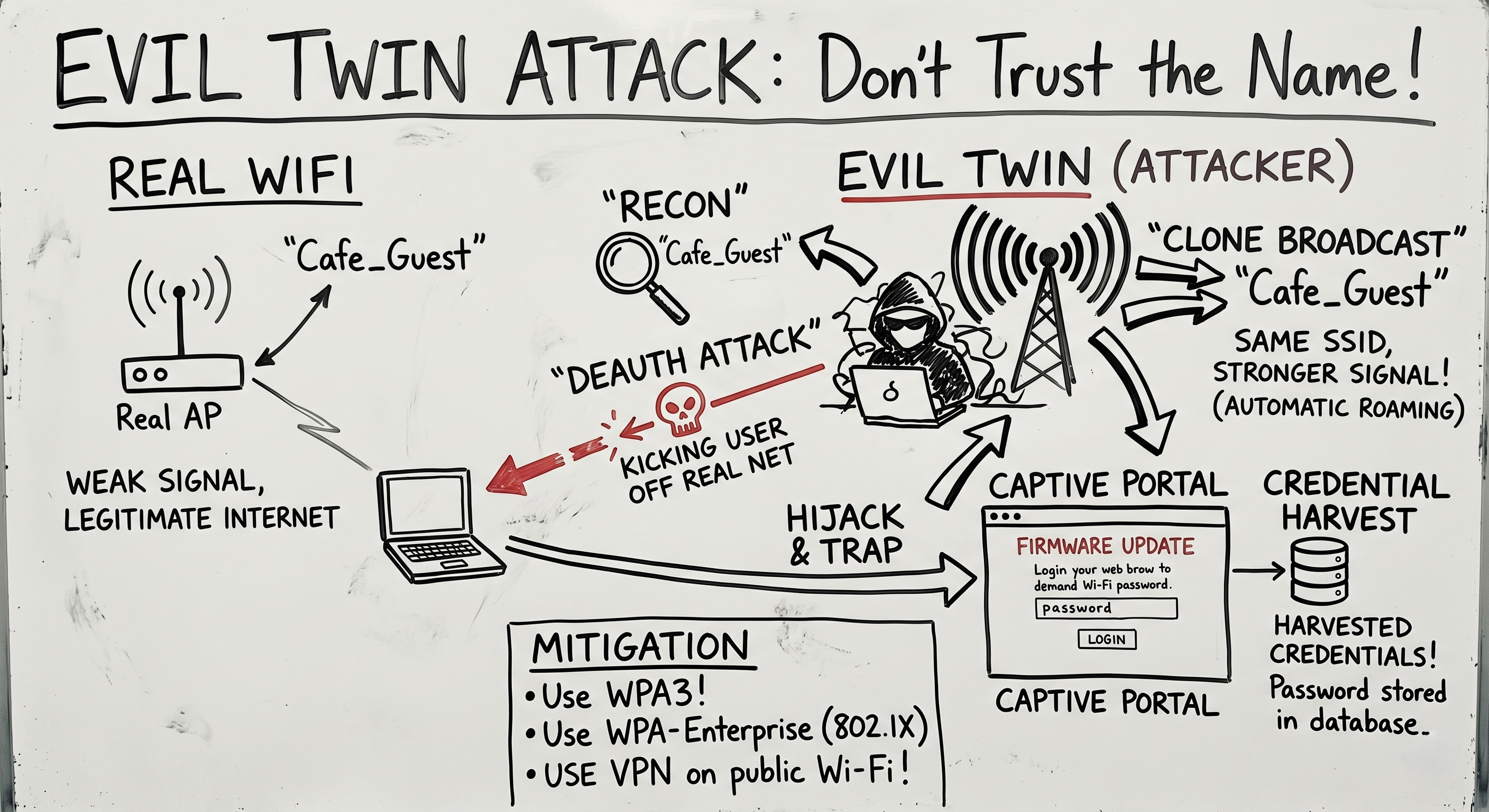
The Arsenal: What You Need
To pull this off, an attacker needs specific hardware and software:
- A Wireless Adapter with “Monitor Mode” and “Packet Injection”: Standard Wi-Fi cards can only read traffic sent directly to them. Monitor mode allows the card to hear all Wi-Fi traffic in the air, while injection allows the attacker to forge and transmit custom packets. (The Alfa AWUS036NHA is a classic choice).
- Frameworks: Tools like
airgeddon,Wifiphisher, orFluxionautomate the entire process.
The Attack Flow: Anatomy of a Hijack
Here is how a red teamer executes an Evil Twin attack from start to finish.
Step 1: Reconnaissance
The attacker puts their wireless card into Monitor Mode and scans the airwaves using a tool like airodump-ng. They identify the target network (SSID: Corp_Guest, BSSID: 00:11:22:33:44:55) and note the channel it operates on.
Step 2: The Deauthentication (Deauth) Attack
To get the victim to connect to the fake network, the attacker first has to kick them off the real one. The attacker forges a “Deauthentication Packet” a standard Wi-Fi management frame that essentially says, “Hey device, the router says you need to disconnect immediately.”
1
2
# Using aireplay-ng to flood the target with deauth packets
aireplay-ng --deauth 1000 -a 00:11:22:33:44:55 wlan0mon
The victim’s phone or laptop suddenly loses its Wi-Fi connection.
Step 3: Spinning Up the Clone
While the victim is disconnected, the attacker launches their Evil Twin. They broadcast a new Wi-Fi network with the exact same name: Corp_Guest.
Crucially, the attacker boosts their signal strength. Wi-Fi devices are programmed to automatically roam to the strongest available signal for a known network. When the victim’s device tries to reconnect, it sees the attacker’s AP as the “better” connection and automatically joins it.
Step 4: The Captive Portal (The Trap)
Now the victim is connected to the attacker, but they need the internet.
When the victim opens a web browser, the attacker intercepts their traffic and redirects them to a Captive Portal. This is a fake login page hosted on the attacker’s machine.
The page is designed to look identical to a legitimate router login, a corporate portal, or a Google login page. It might say: “Firmware Update Required. Please enter your Wi-Fi password to continue.”
Because the user is frustrated that their Wi-Fi just dropped (thanks to the Deauth attack), they often type in the password without thinking.
Step 5: Game Over
The fake portal captures the plaintext password, saves it to the attacker’s database, and then gracefully drops the Evil Twin network. The victim’s device automatically reconnects to the real Wi-Fi, and the victim assumes the “Firmware Update” was successful.
The attacker walks away with the credentials to the network.
Defense: Don’t Trust the Name
Defending against an Evil Twin is tricky because the attack abuses the core design of Wi-Fi roaming. However, there are mitigations:
- WPA3: The newest Wi-Fi security standard makes Evil Twin attacks significantly harder by changing how devices authenticate and share keys, offering protection against unauthenticated roaming.
- Enterprise Security (802.1X): In a corporate environment, networks should use WPA2/WPA3-Enterprise. Instead of a single shared password, devices authenticate using unique digital certificates. Even if an Evil Twin clones the SSID, it won’t have the cryptographic certificate required to fool the client device.
- VPNs: If you are on public Wi-Fi, assume the network is hostile. A Virtual Private Network encrypts your traffic before it ever leaves your device, meaning even if you are connected to an Evil Twin, the attacker only sees encrypted gibberish.
- User Awareness: Train employees to never enter credentials into unexpected pop-up portals, especially if the network suddenly disconnects and reconnects.
Summary for the Exam
- Evil Twin: A rogue Access Point masking as a legitimate network to intercept traffic or steal credentials.
- Deauthentication: Forging management frames to forcefully disconnect legitimate users.
- Captive Portal: A fake web page used to harvest credentials via social engineering.
- Primary Mitigation: WPA-Enterprise (802.1X) and VPN usage.
An Evil Twin attack proves that the most devastating vulnerabilities aren’t always in the code; they are in the user’s assumption of safety.