Windows Privilege Escalation via Unquoted Service Path Vulnerability
A blog on how the Unquoted Service Path vulnerability works and how to defend against it.
When you install a background service on Windows (like an antivirus scanner, a VPN client, or an updater), Windows needs to know exactly where that application’s executable file is located on the hard drive so it can run it when the computer boots up.
This location is called the Service Path.
The vulnerability arises from a quirk in how the Windows API (specifically CreateProcess) handles spaces in file paths when the developer forgets to enclose the path in quotation marks.
The Flaw: The Search Party
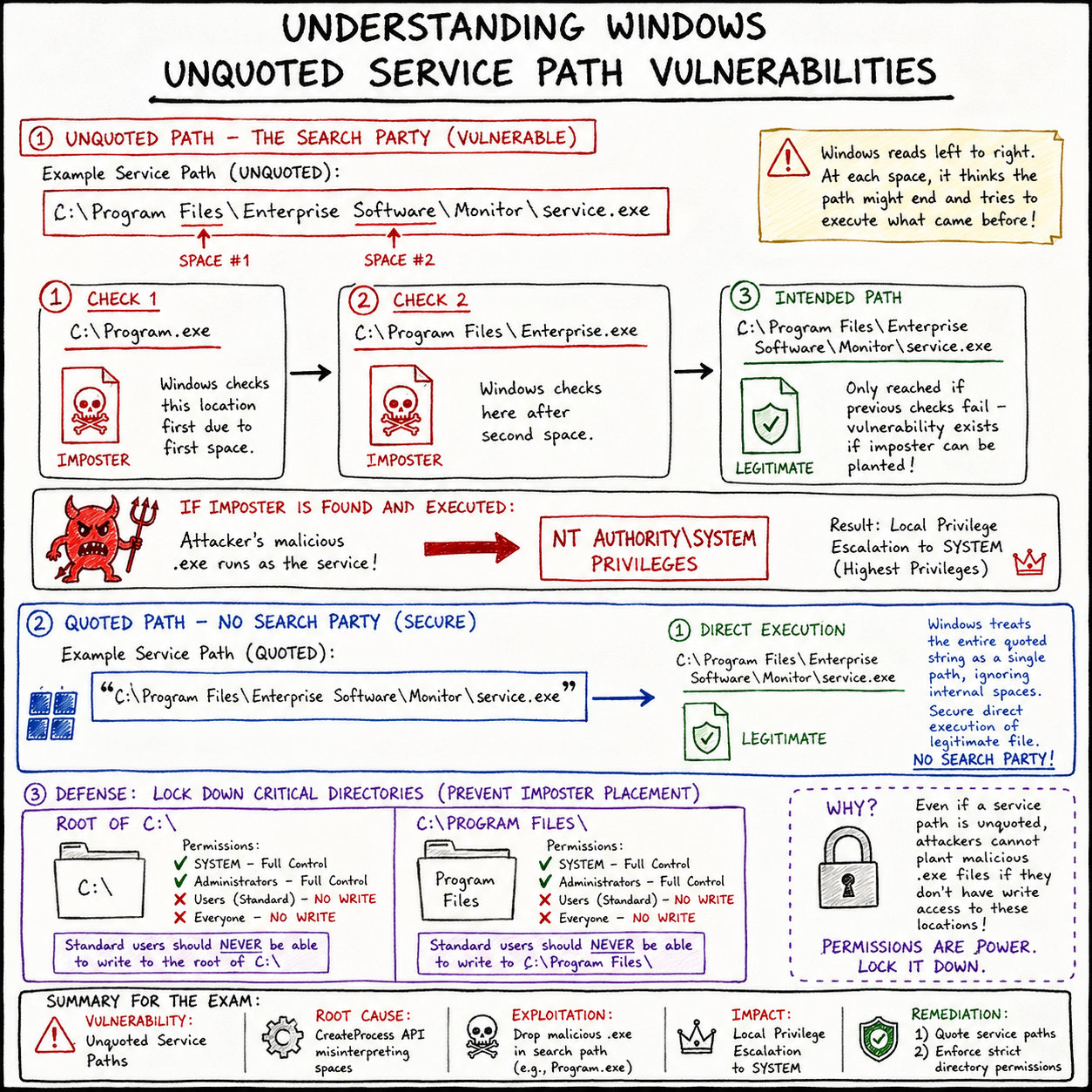
Imagine a third-party software installs a service with the following path: C:\Program Files\Enterprise Software\Monitor\service.exe
Notice there are spaces in Program Files and Enterprise Software. Also notice there are no quotation marks around the entire string.
When Windows tries to start this service, it reads the path from left to right. Because there are no quotes telling Windows “this entire string is one single path,” Windows hits the first space after Program and gets confused. It thinks, “Wait, is the program called Program.exe and Files\Enterprise... are the arguments? Let me check.”
Windows will literally try to execute files in this exact order:
C:\Program.exeC:\Program Files\Enterprise.exeC:\Program Files\Enterprise Software\Monitor\service.exe(The actual intended file)
It stops searching as soon as it finds a match.
The Attack: Planting the Imposter
As an attacker, you have a low-privilege shell on the machine (maybe as a standard user like Bob). You enumerate the system and find this unquoted service path.
You also check the folder permissions and realize that while you can’t overwrite the real service.exe, the C:\Program Files\ directory has weak permissions, allowing standard users to write files to it.
The Exploit: You generate a malicious payload (a reverse shell) and name it Enterprise.exe. You drop it right here: C:\Program Files\Enterprise.exe.
The Trigger: You wait for the server to reboot, or if you have the rights, you manually restart the vulnerable service: net stop "Enterprise Monitor" net start "Enterprise Monitor"
The Execution: Windows tries to start the service.
- It looks for
C:\Program.exe. (Doesn’t exist). - It looks for
C:\Program Files\Enterprise.exe. (IT EXISTS!)
Windows completely ignores the real software and happily executes your malicious Enterprise.exe.
Here is the kicker: because services are usually configured to run as NT AUTHORITY\SYSTEM (the highest power on a Windows machine), your malware is executed as SYSTEM. You just escalated your privileges from a standard user to the absolute god of the machine.
Tools for Hunting
You don’t need to hunt for these manually. Red teamers use automated enumeration scripts to find these misconfigurations instantly.
- WinPEAS (Windows Privilege Escalation Awesome Scripts): The gold standard for Windows enumeration. It will highlight unquoted service paths in bright red.
- PowerUp.ps1: A famous PowerShell script from the PowerSploit framework.
- Command:
Invoke-AllChecks - It will find the vulnerable path and even offer an
Invoke-ServiceAbusefunction to automatically exploit it for you.
- Command:
- WMI (Manual Check): You can query this directly from the command line using Windows Management Instrumentation.
- Command:
wmic service get name,displayname,pathname,startmode |findstr /i "auto" |findstr /i /v "c:\windows\\" |findstr /i /v """
- Command:
Defense: Quote Your Paths!
The remediation for this is almost embarrassingly simple, which is why it’s so frustrating to still find it in modern enterprise environments.
Vulnerable: C:\Program Files\Enterprise Software\Monitor\service.exe
Secure: "C:\Program Files\Enterprise Software\Monitor\service.exe"
By simply wrapping the path in double quotes, you tell the Windows API exactly where the string begins and ends. Windows will no longer attempt to execute Program.exe or Enterprise.exe.
Furthermore, system administrators must ensure strict folder permissions. Standard users should never have “Write” access to the root of the C:\ drive or inside C:\Program Files\. Even if a path is unquoted, the attack fails if the hacker isn’t allowed to drop their imposter .exe file in the right location.