Privilege Escalation via DLL Hijacking
A blog on how attackers exploit the DLL search order in Windows to escalate privileges
When we think of cyberattacks, we often imagine sophisticated exploits targeting unpatched software. But sometimes, the most effective attacks leverage the intended way a system operates.
This is exactly how Privilege Escalation via DLL Hijacking works.
Imagine an important person (let’s call them “System Admin”) relies on a trusted sidekick (“Trusted Application”) to perform important tasks. Now imagine that instead of attacking the powerful Admin directly, you trick the unsuspecting Sidekick into trusting you. When the Admin trusts the Sidekick, you inherit that trust, gaining access to things far beyond your own authority.
In the Windows world, this is what happens when you hijack a Dynamic Link Library (DLL).
What are DLLs?
DLLs (Dynamic Link Libraries) are essentially pre-built libraries of code and data that multiple applications can use. Think of them like specialized toolboxes that various programs on your computer share to avoid reinventing the wheel (e.g., for graphics, networking, printing).
The problem arises in how Windows searches for these toolboxes.
The Flaw: The DLL Search Order
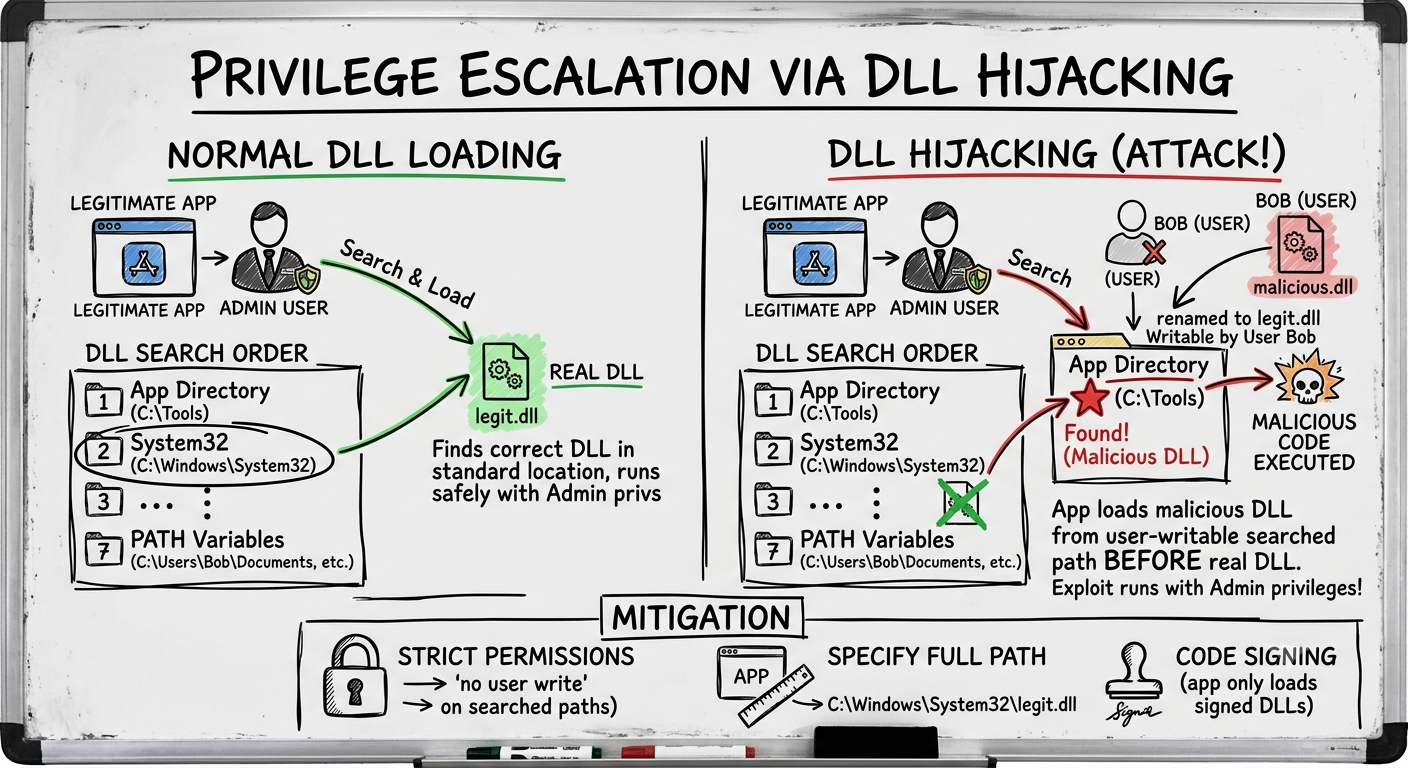
When an application needs to load a specific DLL, and the developer didn’t specify the exact location, Windows follows a very specific search order to find it. Here’s a simplified version of that order:
- Application Directory: The directory from which the application loaded.
- System Directory:
C:\Windows\System32 - 16-bit System Directory: (Rarely used now)
- Windows Directory:
C:\Windows - Current Working Directory: Where the user is currently working.
- System
PATHVariable: Directories listed in the system’s global search path. - User
PATHVariable: Directories in the specific user’s search path.
The Attack Flow: Planting the Imposter
An attacker has already gained low-privilege access to a machine (maybe as Bob). They want to become SYSTEM (the ultimate power on a Windows machine).
Step 1: Reconnaissance
The attacker uses tools like Procmon (Process Monitor) to observe which applications are running and which DLLs they are trying to load.
Let’s say they find an application, CorpUpdater.exe, configured to run with SYSTEM privileges, searching for update_util.dll. The attacker notices that the application first checks the application directory (C:\Applications\CorpUpdater) for the DLL.
The Key Finding: The attacker discovers that the directory C:\Applications\CorpUpdater has weak permissions, allowing even a low-privilege user like Bob to write files to it.
Step 2: Crafting and Placing the Malicious DLL
The attacker creates a malicious DLL that behaves like the real update_util.dll but executes malicious code (like opening a reverse shell) the moment it’s loaded. They place it in the user-writable directory: C:\Applications\CorpUpdater\update_util.dll.
Step 3: Triggering Execution
The attacker waits for CorpUpdater.exe to run. When it starts, it begins its search:
- It checks the application directory (
C:\Applications\CorpUpdater). - It finds the malicious
update_util.dll! - The application loads the malicious DLL, executing the attacker’s code.
Step 4: Privilege Escalation
Because the application was running with SYSTEM privileges, **the attacker’s code now runs as SYSTEM**. The attacker has successfully escalated their privileges to the highest level on the machine.
Defense
Stopping DLL hijacking involves a combination of secure development and robust system configuration:
- Specify Full Paths: Developers should always use absolute, full paths when loading DLLs (e.g.,
"C:\Windows\System32\update_util.dll"). - Strict Directory Permissions: Enforce strong permissions. Standard users should never have “Write” or “Modify” access to application directories or directories in the system
PATH. - Code Signing: Configure applications to only load signed DLLs from trusted publishers.
- Endpoint Detection and Response (EDR): Use EDR tools to detect unusual DLL loading behavior, such as loading a DLL from an unexpected location.